Claim IDs (CSV import)
Warning
This feature is in development. Changes can and will be made without notice.
The claim import takes a CSV file with sandgrain tokens (produced during device production) and claims
these tokens for the tenant at CyberRock. For each token sgauth also creates a Device record, so that the
device can later register itself via Finalize EK.
The import can be started in two ways:
via the web interface (upload a CSV file), see Web upload
via the
claim_idsmanagement command, see Management command
Both run exactly the same import logic.
Web upload
The upload is available from the Claim Token Tools page at the root of the site: https://sgauth.intemo.com/
url |
description |
|---|---|
|
Upload form for the CSV file |
|
List of all imports |
|
Result of import |
These pages require the Can import claim IDs from CSV permission (api.import_claims), which
superusers have implicitly. You must be logged in to the admin site, so the user also needs staff status.
Grant the permission in the admin, on the user or on a group.
After the upload the import runs immediately (synchronously). When it finishes you are redirected to the result page, which shows a summary (number of lines per status) and the result per line (see Result).
If the file is rejected (see Errors), an error message is shown and nothing is imported.
Note
The web upload only uses the first cw/rw pair of each line (equivalent to --max-cw 1).
All imports are stored as a Token import record, and can be viewed later in the admin
(/admin/api/tokenimport/).
CSV format
A comma separated file (UTF-8), one token per line, with at least 10 columns.
column |
name |
description |
|---|---|---|
1 |
time |
timestamp of production (ignored) |
2 |
datamatrix |
datamatrix code (ignored) |
3 |
device_id |
device id (eg: LoRa DevEUI). Used as mqtt |
4 |
pccid |
sandgrain pccid of token/chip, 32 bytes, hex encoded |
5 |
cw |
challenge word, 32 bytes, hex encoded |
6 |
rw |
reply word belonging to cw, encrypted, base64 encoded (see rw encryption) |
7 |
cw2 |
second challenge word (optional) |
8 |
rw2 |
second reply word, encrypted (optional) |
9 |
cw3 |
third challenge word (optional) |
10 |
rw3 |
third reply word, encrypted (optional) |
Additional columns are ignored. A trailing comma is allowed.
Empty lines are ignored.
The first line is treated as a header (and skipped) if its first column contains
timeordatamatrix.Leading and trailing whitespace in a field is ignored.
Example:
time,datamatrix,device_id,pccid,cw,rw,cw2,rw2,cw3,rw3
2026-06-17T17:06:52.191626,123,00013F361EF05AFA,80000000000000000000000000000018b52fbf4d223728a3e54f52af9309c9d9,b06a8bc3f9dd22e3dec55c244e4d0be405e724e991d06ad8e3a4cbfc8f9bb44d,O9/XvwgTHGSsTkfF+EjyGELbtZbeWvt8cPjsbi7fOKX6fNmwTNsMydlaFDtrAzYt5HSDrckPmQTyaTcG,111f5e26616725f26d078859adfb572f72b30ef4719dc431c7214c70db6d9a6f,w3Te9WhcBj1UUh4xAyDgIFfWEkIAfqVvbFVD0uLHeaAv7cA+vk4OOMNdLIuL4z3g8J93G/zasfB0675w,94da036bf0088d0aef8a574b84375b85364503f9969886a5b639be4804695db9,9cDhgcG2aYxebA21KYP3O93UkC8ASPk876UeONgIULY8UfS2mtPxJ5J+wWLHENKU1sRypNele1w6UOgY,
rw encryption
The reply words (rw, rw2, rw3) are secret, and must therefore be encrypted in the CSV file.
algorithm: AES-128-GCM, no associated data
key: 16 bytes, shared between the producer of the CSV and sgauth (setting
CLAIM_ENCRYPTION_KEY)plaintext: the rw as 32 character hex string (ascii)
field value:
base64(nonce || ciphertext || tag), with a 12 byte random nonce and a 16 byte tag
Example encryption in python:
import base64, os
from cryptography.hazmat.primitives.ciphers.aead import AESGCM

def encrypt_rw(key: bytes, rw: str) -> str:
    nonce = os.urandom(12)
    ct = AESGCM(key).encrypt(nonce, rw.encode('ascii'), None)  # ct includes the 16 byte tag
    return base64.b64encode(nonce + ct).decode('ascii')
The CLAIM_ENCRYPTION_KEY environment variable may contain the key as base64, hex or raw string, as long as it
decodes to exactly 16 bytes.
Processing
Before anything is imported, the whole file is checked: the column count of every line and the decryption of every non-empty rw field. If any check fails, the import is aborted and nothing is changed (see Errors).
Then each line is processed:
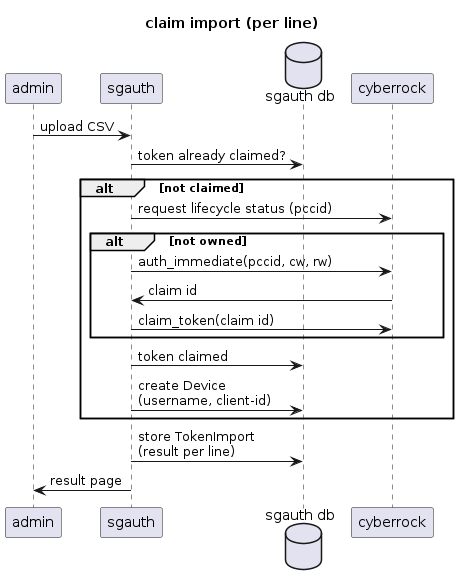
If the token is already claimed in sgauth (or already has a shared secret), the line is
skipped.Otherwise the token is created in sgauth (if it does not exist yet), and CyberRock is asked for its lifecycle status. If CyberRock reports the token is already owned, it is marked as claimed and the line is
skipped.Otherwise the cw/rw pair(s) are used to authenticate the token at CyberRock (
auth_immediate). If CyberRock returns a claim id, the token is claimed (claim_token) and the line isclaimed. If no pair succeeds the line isfailed.A
Deviceis created for the token (if it does not exist yet), with username = id of the token (right 16 bytes of pccid) and client-id = device_id.
Note
By default only the first cw/rw pair is used. Use --max-cw (management command only) to also
try the additional pairs.
Importing the same file twice is safe: tokens that are already claimed are skipped.
Result
Every import is stored as Token import record, with the user that performed the import, and the result per line:
field |
description |
|---|---|
pccid |
pccid of the token |
device_id |
device id from the CSV |
status |
|
cw |
the cw that was used |
claim_id |
claim id returned by CyberRock (empty if no claim was needed) |
status |
meaning |
|---|---|
claimed |
the token is claimed by this import |
skipped |
the token was already claimed (in sgauth or at CyberRock), nothing needed to be done |
failed |
the token could not be claimed (eg: wrong cw/rw, or CyberRock error) |
Errors
The following errors abort the import before anything is changed:
the file is empty, or contains no data lines
a line has less than 10 columns
an rw field can not be decrypted (invalid base64, wrong key, corrupted data, or decrypted rw is not 32 characters). The error message contains the line and column number.
CLAIM_ENCRYPTION_KEYis not configured on the server
Errors per token (eg: CyberRock rejects the cw/rw) do not abort the import, the line gets status failed.
Management command
The same import can be run from the command line on the server:
./manage.py claim_ids <csvfile> --user <username> [--max-cw {1,2,3}] [--validate] [--dry-run]
option |
description |
|---|---|
|
path to the CSV file (see CSV format) |
|
username of the (django) user that performs the import (mandatory, stored in the import record) |
|
number of cw/rw pairs per line that may be used: 1, 2 or 3 (default 1, only the first pair) |
|
only check at CyberRock if the tokens in the file are claimed. Tokens that are not claimed at CyberRock are reset in sgauth |
|
in combination with |
Examples:
# claim all tokens in the file
./manage.py claim_ids production.csv --user harm

# check claim status at CyberRock, without changing anything
./manage.py claim_ids production.csv --user harm --validate --dry-run
