API v1.0
Warning
This api is in development. Changes can and will be made without notice.
The base url is: https://sgauth.intemo.com/
Routing table
Authentication API
The authentication api can be invoked by client to verify if credentials are ok. This is typically invoked by mosquitto (mosquitto-go-auth plugin).
mosquitto
This api implements the http interface of mosquitto-go-auth
See table below for configuration items
config item |
value |
|---|---|
auth_opt_backends |
http |
auth_opt_http_host |
sgauth.intemo.com |
auth_opt_http_port |
443 |
auth_opt_http_getuser_uri |
/api/1.0/auth/mqtt/getuser |
auth_opt_http_aclcheck_uri |
/api/1.0/auth/mqtt/aclcheck |
auth_opt_http_superuser_uri |
/api/1.0/auth/mqtt/superuser |
auth_opt_http_with_tls |
true |
auth_opt_http_response_mode |
status |
auth_opt_http_params_mode |
json |
auth_opt_http_timeout |
2 |
getuser
- POST /api/1.0/auth/mqtt/getuser
This is the auth_opt_http_getuser_uri url that mosquitto-go-auth invokes.
Example request:
POST /api/1.0/auth/mqtt/getuser HTTP/1.1
Host: sgauth.intemo.com
Content-Type: application/json

 {
    "clientid": "auto-E0CC51DE-815E-3502-0BF4-7796C60893BB",
    "password": "test",
    "username": "test"
 }
Example response:
HTTP/1.1 201 CREATED
Example response:
HTTP/1.1 401 Unauthorized
- Request JSON Object:
clientid (str) – mqtt clientid
username (str) – mqtt username
password (str) – password to be validated
- Status Codes:
201 Created – credentials are accepted
401 Unauthorized – Not authorized, provided credentials are not accepted
aclcheck
- POST /api/1.0/auth/mqtt/aclcheck
This is the auth_opt_http_aclcheck_uri url that mosquitto-go-auth invokes.
Example request:
POST /api/1.0/auth/mqtt/aclcheck HTTP/1.1
Host: sgauth.intemo.com
Content-Type: application/json

{
    "acc": 4,
    "clientid": "auto-4C71BC22-5F0B-3532-1107-55A7B7F53D3B",
    "topic": "test/#",
    "username": "test"
}
Example response:
HTTP/1.1 201 CREATED
Example response:
HTTP/1.1 401 Unauthorized
- Request JSON Object:
acc (int) – action 1 is read, 2 is write, 3 is readwrite, 4 is subscribe
clientid (str) – mqtt clientid
username (str) – mqtt username
topic (str) – mqtt topic (may contain mqtt wildcards)
- Status Codes:
201 Created – Access is granted
401 Unauthorized – Access is not granted
superuser
- POST /api/1.0/auth/mqtt/superuser
This is the auth_opt_http_superuser_uri url that mosquitto-go-auth invokes.
Example request:
POST /api/1.0/auth/mqtt/superuser HTTP/1.1
Host: sgauth.intemo.com
Content-Type: application/json

{
    "username": "test"
}
Example response:
HTTP/1.1 201 CREATED
Example response:
HTTP/1.1 401 Unauthorized
- Request JSON Object:
username (str) – mqtt username
- Status Codes:
201 Created – user is superuser
401 Unauthorized – user is not superuser
IoT API
The IoT api is an api intended for devices that contain sandgrain tokens (=sandgrain chip). This api can be used to:
Created a shared secret
Store meta data
pccid |
sandgrain id (32 bytes) |
tid |
transaction id |
cw |
challenge word (32 bytes) |
rw |
reply word (16 bytes) |
ek |
ephemeral key (shared secret) (16 bytes) |
The following sequence diagram shows how an IOT device and sgauth establish a shared secret. This shared secret is later used for authentication (as password)

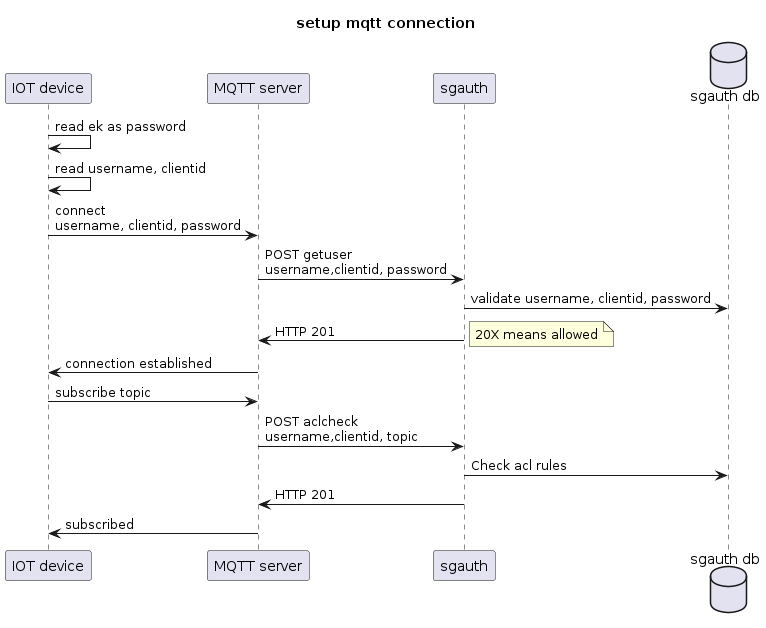
Setting up an mqtt connection is shown in the sequence diagrom below. Note that establishing an mqtt connection does not involve the sandgrain token (on the device), nor the cyberrock api. It uses the shared secret (ek) stored in the device, and stored hashed in sgauth.
Initiate EK
- POST /api/1.0/iot/ek-init
Initiate an ephemeral key exchange Nodes, Schedules all belong to an organization.
Example request:
POST /api/1.0/iot/ek-init HTTP/1.1
Host: sgauth.intemo.com
Content-Type: application/json
Authentication: Basic dXNlcjpzZWNyZXQ=

{
    "sg": {
       "pccid": "800000000000000000000000000000188d7aa5f9036480c8aa62f400023f2faa"
    }
}
Example response:
HTTP/1.1 201 OK
Content-Type: application/json; charset=utf-8

{
    "sg": {
       "cw": "93ceada15860e236d36a90398596e18879c785aa06aa03aab1db27a6da6939fd",
       "tid": "411fbdb2-b2df-4ef9-a953-4a823ef471a1"
    }
}
Example response:
HTTP/1.1 503 Service Unavailable
- Query Parameters:
pretty – bool: if true, json will we returned pretty formatted
- Request JSON Object:
pccid (str) – 32 bytes, hex encoded pccid of sandgrain token
- Response JSON Object:
cw (str) – sandgrain challenge word, 32 bytes, hex encoded
tid (str) – sandgrain transaction id, must be sent in next ek-fin api call
- Status Codes:
201 Created – OK
401 Unauthorized – Login or credentials required (http basic auth failed)
403 Forbidden – Authorization error (sandgrain error, or internal api error)
503 Service Unavailable – Upstream server (sandgrain cyberrock) is down/not responding
Finalize EK
- POST /api/1.0/iot/ek-fin
Finalize an ephemeral key exchange. And optionally store meta data (if authentication succeeded).
After this call, both the api caller (device), and the api (agauth) know a shared secret (ephemeral key). The device should store this in non volatile memory. sgauth will store this secret hashed, so that it can do password validations on it.
Example request:
POST /api/1.0/iot/ek-fin HTTP/1.1
Host: sgauth.intemo.com
Content-Type: application/json
Authentication: Basic dXNlcjpzZWNyZXQ=


{
    "sg": {
       "pccid": "800000000000000000000000000000188d7aa5f9036480c8aa62f400023f2faa",
       "cw": "93ceada15860e236d36a90398596e18879c785aa06aa03aab1db27a6da6939fd",
       "tid": "411fbdb2-b2df-4ef9-a953-4a823ef471a1",
       "rw": "410eeed408ae7c482128f1b279f79f46",
    },
   "meta": {
      "username": "8d7aa5f9036480c8aa62f400023f2faa",
      "client-id": "0004A30B01668119",
      "product": "cityzenz-connect",
      "serial": "20251200123",
      "board": "CZ-STM32-17A",
      "revision": "2A03",
      "firmware": "1.2.3-1-ga807e57",
      "location": {"latitude": 51.23, "longitude": 5.17}
  }
}
Example response:
HTTP/1.1 201 CREATED

{
  "status":"ok"
}
Example response:
HTTP/1.1 403 FORBIDDEN

{
  "status": "fail",
  "details": "sandgrain auth error"
}
- Request JSON Object:
pccid (str) – sandgrain pccid of token/chip, 32 bytes, hex encoded
tid (str) – sandgrain transaction id, received from matching ek-init api call
rw (str) – sandgrain reply word, 16 bytes, hex encoded (generated by sandgrain token chip)
meta.username – username that system wants to use for mqtt authentication (mandatory), must be right 32 bytes of pccid or the complete pccid. must be unique.
meta.client-id – client-id that system wants to use for mqtt authentication (optional), must be unique. If a client-id is passed, it will be used for authentication. (Then the combination username/client-id/password must match). If not passed only username/password is used for authentication.
meta.serial – serial number that system wants to store (optional), must be unique
meta.board – board type that system wants to store (optional)
meta.revision – board revision that system wants to store (optional)
meta.firmware – firmware version that system wants to store (optional)
- Response JSON Object:
cw (str) – sandgrain challenge word, received from matching ik-init api call
- Query Parameters:
pretty – bool: if true, json will we returned pretty formatted
- Status Codes:
201 Created – OK
401 Unauthorized – Login or credentials required (http basic auth failed)
403 Forbidden – Authorization error (sandgrain error, or internal api error)
503 Service Unavailable – Upstream server is down/not responding (try again later)
Update metadata
- POST /api/1.0/iot/meta/<id>
Update or create metadata.
Example request:
POST /api/1.0/iot/meta/8d7aa5f9036480c8aa62f400023f2faa HTTP/1.1
Host: sgauth.intemo.com
Content-Type: application/json
Authentication: Basic dXNlcjpzZWNyZXQ=, Bearer <shared-secret>


{
   "meta": {
      "client-id": "0004A30B01668119",
      "product": "cityzenz-connect",
      "serial": "20251200123",
      "board": "CZ-STM32-17A",
      "revision": "2A03",
      "firmware": "1.2.3-1-ga807e57",
      "location": {"latitude": 51.23, "longitude": 5.17}
  }
}
Example response:
HTTP/1.1 201 CREATED
- Request Headers:
Authorization – Bearer + shared secret as exchanged in Finalize EK)
- Parameters:
id – sandgrain id (right 16 bytes of pccid)
- Query Parameters:
pretty – bool: if true, json will we returned pretty formatted
- Request JSON Object:
meta.client-id (str) – client-id to user for mqtt authentication (May be empty, maybe identical to username, may be different)
meta.serial (str) – unique serial number of device (eg: “20250400125”)
meta.board (str) – Board type
meta.revision (str) – Board revision
meta.firmware (str) – software firmware version
meta.location (str) – gps location of device (at moment of key registration)
meta.product (str) – Product range identifier
- Status Codes:
201 Created – OK
401 Unauthorized – Login or credentials required (http basic auth failed, or http bearer auth failed, see response)
